
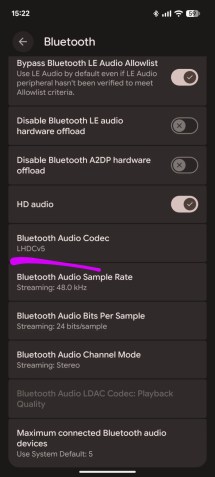
The official what’s new in Android 17 post from Google doesn’t mention it, but the latest OS version includes support for LHDC v5. Eagle-eyed Redditors first spotted it a few months ago in Android 17 beta 3, but now the stable release for Google’s Pixel phones has it for those who skip over the betas.
To make sure LHDC version 5 is active, you may have to go into the Developer Settings – go to Settings, About phone and tap Build Number a few times. You will get a notification and a new option in the settings.
Once inside Developer Settings, look for Bluetooth Audio Codec – does it say LHDC v5? If not, tap it and you should see a list of available codecs.
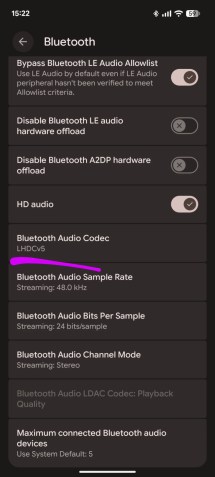
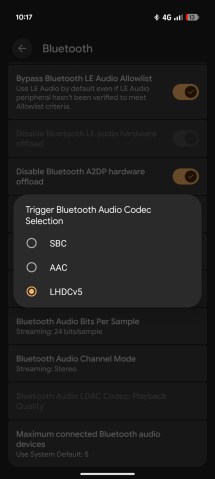
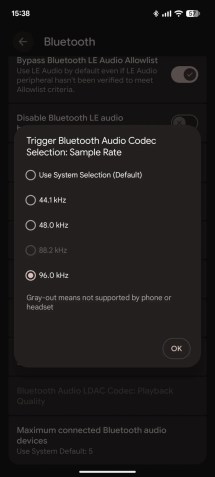
Checking and enabling LHDC v5 on a Pixel phone with Android 17

Note that a lot of Bluetooth headphones already support v5, e.g. the Nothing Ear (2), which was announced three years ago, and newer ones like the OnePlus Buds 4 from last year. Some phones supported v5 too, but obviously not Pixels. If your headphones have a companion app, check if it has a Hi-Res Audio option. Ideally, you will try this with high-quality music, e.g. one of the streaming services with Lossless mode (e.g. Apple Music or Spotify).
LHDC v5 enables a low-latency connection of 80ms (it’s what the “L” in “LHDC” stands for) with an adaptive bit rate of 128Kbps to 900Kbps. And you can push the sampling rate to 96kHz.