
The Samsung Galaxy Z Fold8, Z Fold8 Ultra and Z Flip8 introduced a feature called My FanCam, which is also featured on the Galaxy S26 FE. The team that developed it shared their inspirations, thoughts and goals for this feature.

(From left) Sherry Hong, Sunghwan Kim and Hwangpil Park

Sharing fan videos of K-pop performances has become a popular activity among music fans – but until now they had to manually edit the video. My FanCam allows them to create a cut of the video that tracks one person as they move across the stage – all it takes is a single tap.
Object tracking isn’t new, but old methods had their pitfalls – if the object being tracked gets obscured (by, say, other people on the stage), the algorithm can get confused. Samsung used an AI model that recognizes individuals and locates them in the frame – that allows My FanCam to reframe the video to keep them in the center.
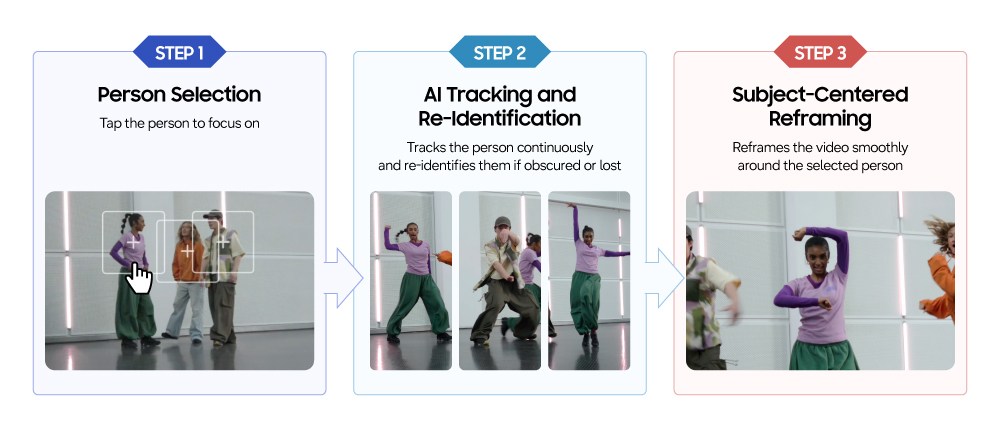
How My FanCam works

“We focused on reducing wait times while editing. Users may want to switch between people in group videos, but reanalyzing the video each time would mean waiting again. We designed My FanCam to analyze multiple people at once, letting users switch between subjects and instantly see the results once the initial analysis is complete,” said Sunghwan Kim of the Multimedia Development Group at Samsung MX.
The app allows the user to choose different aspect ratios for the final video – standard 16:9, vertical 9:16 and even 1:1, which are suitable for sharing across different social media networks.

“Testing a large range of scenarios is important before rolling out new features. To help the development team test with a wide range of scenarios, multiple team members helped with the process. Some brought in old videos from the college days, such as dance club videos. Others would bring a phone and film new footage, such as climbing hobbies,” said Sherry Hong, also of the Multimedia Development Group.
“The key challenge was processing AI workloads entirely on-device without a separate server. Longer videos require more computation, so we had to consider processing speed, power consumption, and heat generation. Samsung Research optimized the AI model to achieve the required results with less computation, while the MX Business streamlined the entire process — from video decoding to data transfer and analysis — reducing computational load with minimal impact on performance,” added Kim.
The team also offers some tips to help you get the best results out of My FanCam. You should choose a high resolution video mode since the app will be cropping in to frame the chosen subject. For the same reason, you should frame your shot slightly wider than you would normally.
When picking a subject to track, it’s best to do it in a frame where they aren’t overlapped by others and their face is visible. You can use a tripod to get a stable image – but that’s for new videos. You can also try My FanCam with videos you recorded years ago, just like the team did.